Accounting made simple
Less manual entry. AI reads your invoices and receipts. Payments are matched to them and the journal entries are created automatically. You review and confirm.
- Free plan for up to 5 clients
- No card required
- See your company's finances at any time
- You issue invoices that meet Bulgarian law
- Your data is protected and stored in the EU
How an invoice is booked
- 01
You upload the document.
An invoice or a receipt, as a photo or a file.
- 02
AI reads it.
Supplier, company ID, number, dates, amounts, VAT and line items. Uncertain fields are highlighted next to the original.
- 03
You approve. The entry is ready.
Net and VAT are checked against the total. Once you approve, the journal entry is created automatically.
- 04
It goes into the VAT ledgers.
The purchases ledger, VAT return and SAF-T file are filled in from the approved documents.
Review and confirmation
You confirm every suggestion.
AI fills in the data from your documents, and you check it. You see the reason for every suggestion. Automatic confirming and matching run only if you turn them on.
- Invoice number in the reference
- Same amount
- The client's known bank account
A reason for every suggestion
The reason can be the invoice number or company ID in the payment reference, the amount, a known account or a name. You always see why a match was suggested.
Uncertain fields are highlighted
Documents filled in by AI are labelled. Fields AI is unsure about are highlighted next to the original.
Checks before every entry
Net and VAT are checked against the total. Statement lines are checked against the balances. If a line appears twice, you see a warning.
Automatic only if you turn it on
Documents that pass the checks can be confirmed automatically. Exact bank matches can be linked automatically. Both are off by default.
How it works
A closer look
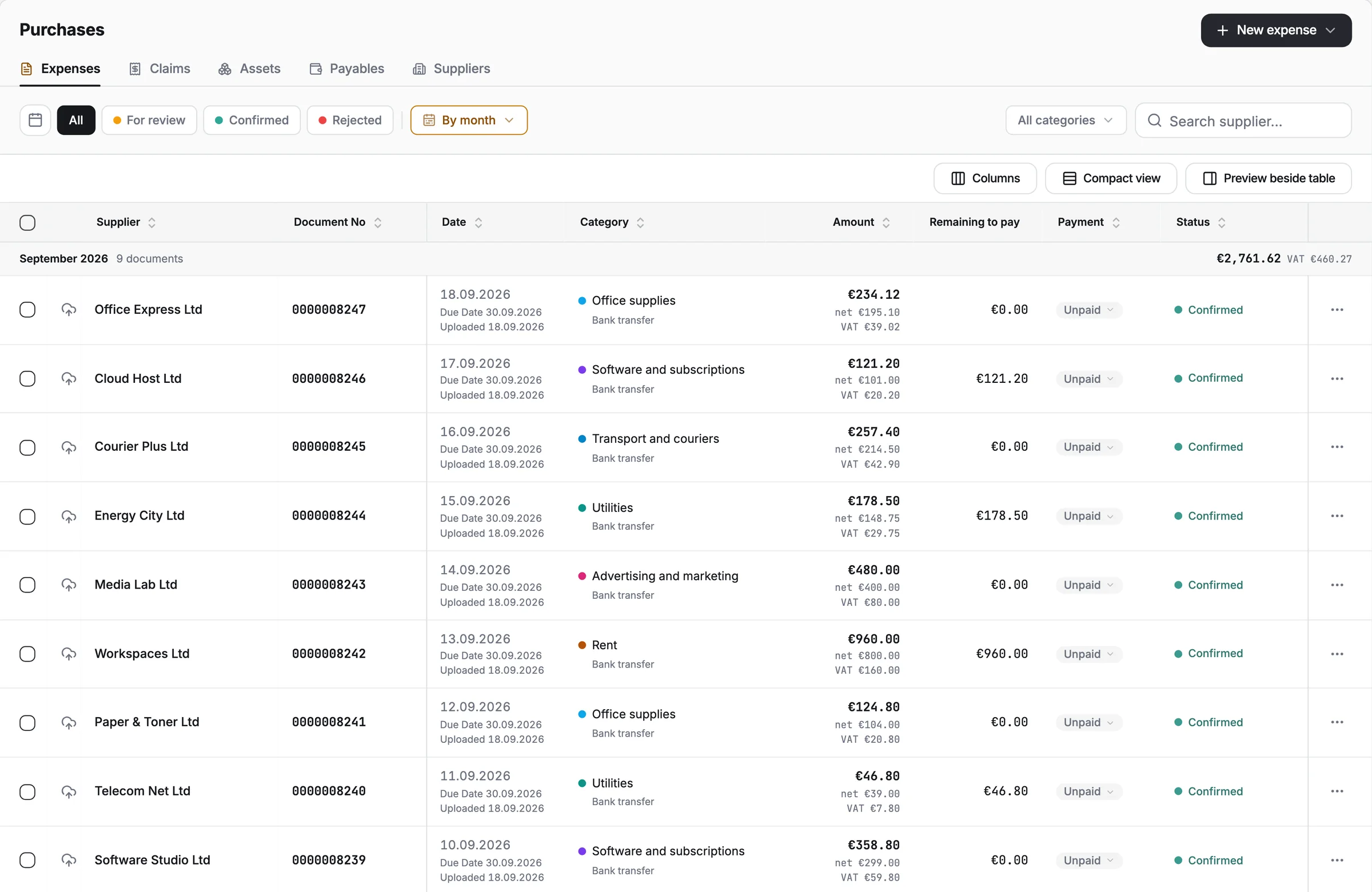
Upload invoices and receipts. AI fills in the details for you.
Purchases module · from Pro
Upload invoices and receipts. AI fills in the details for you.
- Uncertain fields are flagged
- Amounts are checked automatically
- Auto-confirm, if you turn it on
Purchases module · from Pro
Upload a bank statement and AI reads it. For each payment smetni suggests the document it belongs to and shows why.
- A reason for every suggestion
- Remembers rules from your past matches
- Auto-match, if you turn it on
Bank module · from Business
Journal entries are created automatically from your documents and payments.
- General ledger and financial statements
- VAT ledgers and returns
- Month-end close
Accounting module · from Business
AI apps
You can work with your books from an AI app.
You connect Claude, ChatGPT, Cursor or another app that supports MCP. Then you work with your books from the chat you already use.
- Every change waits for your confirmation in smetni before it is saved
- Sees only what your role in smetni allows
- The company admin decides whether AI can propose changes, and can switch MCP off at any time
Which invoices are overdue, and by how much?
3 invoices are overdue, €4,860.00 in total:
| Bistra Design Ltd | 0000001042 | 12 days | €2,180.00 |
| Sever Logistics Ltd | 0000001037 | 21 days | €1,560.00 |
| Arka Studio Ltd | 0000001029 | 34 days | €1,120.00 |
Bistra Design Ltd owes the most.
Bistra Design Ltd paid invoice 0000001042 today. Record the payment.
Nine modules for your company's finances.
You, your team and your accountant work on the same data. Each person has their own role and permissions.
- SalesInvoices, quotes, credit and debit notes. You see which are paid and which are overdue.Every plan
- PurchasesAI reads the supplier, amounts, VAT and category from your expense documents.From Pro
- BankAI reads your bank statements. For each payment, the app suggests the document it belongs to.From Business
- PersonnelYou import payroll costs from your payroll files and track the payments.From Business
- DeclarationsVAT ledgers, VAT returns, SAF-T and upcoming deadlines. For Bulgaria.From Business
- AccountingAutomatic journal entries, general ledger, trial balance and financial statements.From Business
- FilesFolders for contracts, statements and documents, shared with your team.From Pro
- AnalyticsRevenue, payments and overdue amounts by period and client.From Pro
- IntegrationsAutomatic invoices from Stripe, CSV and XLSX export, and API keys.From Pro
For freelancers, growing companies and accounting firms.
All solutions- Self-employedYou issue an invoice in under two minutes and upload expenses from your phone. Your documents are ready for your accountant.
- Small businessRoles for your team and accountant, reminders for overdue invoices and bank matching.
- Larger companiesUnlimited users, several companies in one account, API keys and a custom contract.
- AccountantsA separate organization for every client. AI reads the expenses, you review them and export to CSV or XLSX.
Pricing
Pick the plan you need.
Free
For your first invoices
€0forever
No card. Invoices, quotes and notes as PDF for up to 5 clients.
Start freeStarter
For invoicing
€15/mo excl. VAT
€180 billed yearly. Sales and the client portal. 25 clients, 2,000 AI credits a month.
Create accountPro
For sales and expenses
€40/mo excl. VAT
€480 billed yearly. Adds Purchases, Files, Analytics and Integrations. 100 clients, 5,000 AI credits a month.
Create accountBusiness
RecommendedFor teams and full accounting
€90/mo excl. VAT
€1080 billed yearly. Adds bank matching, automatic entries and VAT returns. 250 clients, 10,000 AI credits a month.
Create account
EnterpriseAll modules, unlimited clients and users, and API keys. AI credits, storage and terms are agreed with you.
Talk to usFrequently asked questions
Short answers about the software. The pricing page has the details of each plan.